
DISCOVRY
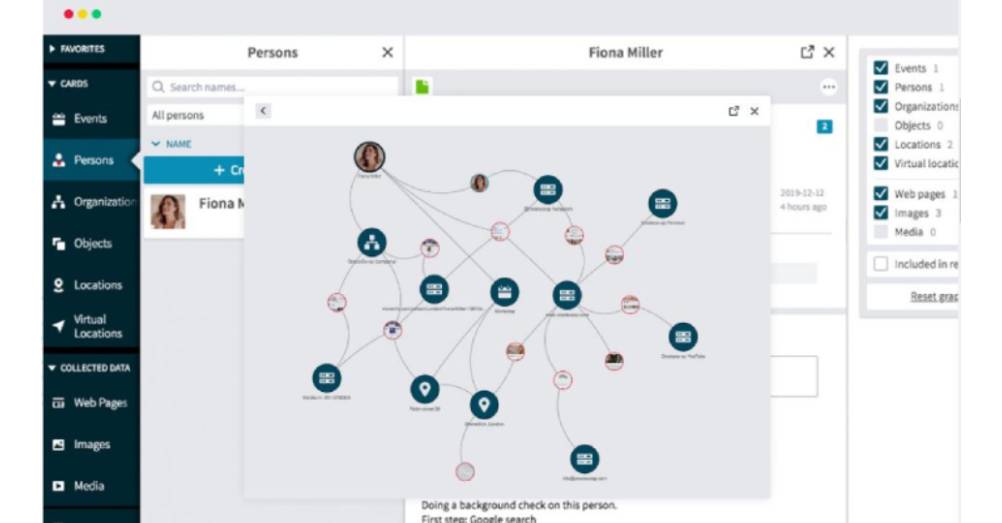
Build your case and drive the investigation forward
Description
Discovry puts an end to disordered investigations with powerful features that let you quickly and effectively transform piles of data into actionable intelligence. And finally close the case.
The Discovry workflow:
1 Discover
Discover and collect information from any type of connected data source – online or offline – and integrate it directly in Discovry.
2 Secure
Lock down evidence while keeping data integrity intact, and confidently build a case that will hold up in court.
3 Structure
Run and maintain a structured investigation. Gather all data in one place, divide it into categories and set priorities.
4 Report
Automatically generate a well-designed report. It’s simultaneously updated as you build your case – ready when you are.
Top features:
All tools in one place – With access to a complete set of aggregated tools and services, you can find and cross-reference any type of data.
Integrated browser – Thanks to an integrated browser, it’s easy to add any data to your collection. And all collection features are gathered in one convenient place.
Always sharable results – With an automatically generated report, it’s easy to keep other parties in the loop about case updates and share results along the way.
Hidden data made visible – Save time and stop clicking through to find out whether images have any hidden Exif data. Data is displayed automatically.
Visualized connections – Map out the big picture. Instantly review connections between collected data and identified targets in a clear visual format.
Side by side with Darknet – Swiftly alternate between the clear web and darknet – without losing access to essential Discovry functions.
Discovry system requirements:
| Minimum requirements | Recommended requirements |
| OS: Windows 8.1 or macOS (latest), 64-bit | OS: Windows 10 or macOS (latest), 64-bit |
| Memory: 4 GB | Memory: 8 GB |
| Processor: Multi-core | Processor: Multi-core (Core i5 or better) |
| Network: Broadband Internet connection | Network: Broadband Internet connection |
| Screen: Minimum screen resolution of 1366×768 Recommended requirements | Screen: Dual screens with a resolution of 2560×1440 |